Agent Management FAQ
Get answers to the most frequently asked questions about Agentstudio and Platform AI agents.
General
What are the Boomi AI terms and conditions?
You can review the terms and conditions for Boomi AI in our Boomi Product Specific Terms document.
What are AI agents?
AI agents are autonomous or semi-autonomous software systems that achieve a defined goal by observing environments, following instructions, using reasoning, and taking action.
Since AI agents are non-deterministic, they can:
- Adapt to different contexts and unique or evolving scenarios
- Generate natural, personalized responses
- Learn over time (when there is access to memory and feedback)
For example, a travel booking agent could receive a user’s request and independently orchestrate other AI agents in order to book the requested travel experience. Different AI agents work together to obtain information and then take action by reserving a hotel, car rentals, and flights. Refer to About AI agents to learn more.
Data protection and privacy
Review common data privacy questions. For complete information on security, compliance, privacy, and data flow, visit the Boomi Trust Center.
How do you manage the segregation/privacy of the prompts? Could you confirm that the prompts generated by the customer are only accessible by the customer?
Prompts generated by a customer are only accessible by that customer. The NLP layer of the conversational experience is built by Boomi (with privacy by design principles) with a segregation of customer and user prompts. AWS Bedrock holds these prompts, but they are not used to train any shared models. Customer-specific data is not used to train the model.
Does Boomi AI use external LLMs or other AI technologies?
We employ a Composite AI framework that dynamically selects the most suitable AI model for a given use case from a pool of models. These models encompass a range, from Small Language Models (SLMs) and Large Language Models (LLMs) to those built on AI/ML algorithms such as Neural Networks and K-Means clustering.
We utilize Anthropic Claude via Amazon Bedrock’s managed service for our LLM. All of this operates seamlessly within AWS, sharing the same infrastructure as the main instance of our Boomi Enterprise Platform’s SaaS solution.
The Agent Designer employs a framework that selects the most suitable model for a given function, such as reasoning, summarization, and guardrails. It uses LLMs via Amazon Bedrock's managed service.
Is customer data used to train Boomi or third-party provider models?
No. Customer data is not used to train or fine-tune any Boomi models or the foundational large language models (LLMs) used by Boomi AI. We use de-identified metadata for training. Only process constructs are used. The model does not include any configuration data. The logs used for training the model do not contain your underlying processed data.
Third-Party LLM Providers: Boomi leverages AWS Bedrock as its third-party LLM provider. AWS Bedrock will not share your data with third parties or store your data beyond what is required to complete the request. All data shared with this provider is governed by contractual and compliance safeguards, and is used solely to deliver the requested service.
Boomi Platform Agents: Your prompts and conversation history are not analyzed or used to improve Boomi's AI features. Platform Agents do use de-identified Design Time Configuration Metadata in aggregated form to support the improvement of intelligence features. Customers may opt out of this specific process by contacting Boomi Support.
Where is my data stored, and does it leave my region?
All Boomi AI data, including knowledge bases, data stores, and foundational models, is deployed within data centers located in North America. Data remains exclusively within these regional boundaries and is not replicated or transferred beyond them.
Boomi is actively working toward offering availability in sovereign data centers outside North America to support the regulatory requirements of its global customer base.
How is my data encrypted and protected?
All Boomi AI data is encrypted both at rest and in transit. For agents created with Boomi Agentstudio (Agent Designer), sensitive data is additionally encrypted with a customer account-specific encryption key, providing an additional layer of protection unique to each customer's account.
Additional protection measures include:
| Protection Measure | Description |
|---|---|
| Agent Session Isolation | Each agent session is treated independently. Chat history is stored within the specific agent session, so data from one customer's session is not accessible to another customer. |
| Access Control | Access to chat history and agent session data is restricted to authorized personnel within the customer organization. Only those with the appropriate permissions can view or manage this data. |
| Audit Trails | All actions related to agent sessions are logged, providing an audit trail that records who accessed data and when, supporting accountability and transparency. |
What types of data does Boomi AI store, and for how long?
The types and retention periods of data depend on whether you are using Platform Agents or Agentstudio.
Platform Agents: Conversation history and user feedback are retained indefinitely.
Agentstudio: Retention depends on data type and usage scenario, as summarized in the table below.
| Data Type | Scenario | Retention Policy |
|---|---|---|
| Agent and Tool Specifications | All Scenarios (Chat or Agent Step) | Stored indefinitely. Agent goals, instructions, and tool definitions are persisted within the Boomi Platform. |
| Provider Metadata and Usage Metrics | All Scenarios (Chat or Agent Step) | Stored indefinitely. Configuration metadata and metrics (e.g., token usage) retained for monitoring. |
| Agent Session (conversation history, prompts) | Chat Interface | Stored indefinitely unless deleted by the user. Users may delete their conversation history at any time. |
| Agent Session (conversation history, prompts) | Agent Step (Automated Integration) | Not stored. Prompts and responses are processed to continue the integration Flow; no record is retained. |
| Tool Outputs | All Scenarios | Not stored. Outputs generated by tools during a session are processed for execution but are not persisted. |
Refer to Boomi Data Flows for more details on data retention.
Can I delete my conversation history or agent session data?
Yes. Agentstudio stores chat interface sessions indefinitely unless a user chooses to delete it. Users can delete their conversation history at any time from within the Agent Garden interface.
For automated Agent Step interactions (agents invoked within an integration process), no session data is stored — prompts and responses are processed in memory to continue the integration flow and are not persisted.
Is my data isolated from other customers' data?
Yes. Boomi enforces strict agent session isolation. Each agent session is treated as an independent context, and chat history is scoped exclusively to that session. Data from one customer's session cannot be accessed by another customer's environment.
What controls does Boomi have to protect against prompt injection attacks?
Boomi employs a multi-layered approach to protect against prompt injection and other adversarial inputs:
-
Technical Controls: We implement rigorous Input Validation and Output Encoding to sanitize data, alongside Contextual Awareness to differentiate between user commands and data instructions.
-
Integrated Guardrails: The platform utilizes both backend and customizable guardrails to detect and block attempts to manipulate agent behavior. These include AWS Bedrock guardrails and Boomi-native constraints that can be customized by our customers to filter for profanity, prompt attacks, and general harmful content categories.
-
Operational Monitoring and Governance: Boomi provides centralized visibility and control over agent activity. For Agentstudio specifically: Customers utilize the Agent Control Tower to monitor operational signals such as input/output token usage, invocation counts, and error rates. These signals help to surface suspicious patterns associated with prompt abuse. If a suspicious pattern arises, customers can immediately disable the affected agents within Control Tower.
-
Organizational and Security Controls: We maintain strict role-based access controls based on the principle of least privilege to limit the scope of agent interactions.
-
External Validation: Boomi regularly engages an independent security firm to perform an OWASP LLM Top 10 penetration test covering both direct and indirect prompt injections. An executive summary of these tests for Agentstudio is available to customers under NDA. A comprehensive listing of Boomi’s security and compliance principles along with a listing of our independent certifications is available on our public-facing Boomi Trust Center.
Agent Control Tower supports a robust set of anomaly detection capabilities to give our customers an intelligent agent observability dashboard. Boomi’s anomaly detection empowers platform users with rapid insight into irregular or unexpected agent behaviors. For details on anomaly detection thresholds and types, refer to the Detecting Anomalies section of the Boomi AI documentation.
Can I track where my sensitive or personal data is being used?
Yes. Boomi DataDetective identifies and classifies sensitive data fields and tracks their geographic movement across integrations. Within Agentstudio, customers can audit agent behavior, view data lineage, and monitor how data flows across integrations, workflows, DataHub, and APIs.
DataDetective uses Boomi's internal small language models (SLMs) to determine and classify data sensitivity by analyzing field and step names. It does not process the actual data values, only metadata.
Does Boomi AI support human-in-the-loop oversight for sensitive decisions?
Yes. The level of human oversight is configurable depending on the type of agent used:
- Platform Agents (e.g., DesignGen, Scribe, Resolve): Many platform-native agents generate outputs that require explicit customer approval before being persisted in the Boomi Enterprise Platform. They operate within a predefined, limited scope.
- Agentstudio Agents: Customers define the level of autonomy and oversight when designing their agents. This includes specifying goals, instructions, tools, guardrails, and whether human-in-the-loop approvals are required at specific steps.
Across all Boomi AI services, guardrails and access controls ensure that agents and the tools they use act only within authorized scopes.
What should I know about third-party agents and data privacy?
You can register third-party agents in the Boomi Platform and monitor them via Agent Control Tower. However, because external developers build and maintain these agents, Boomi cannot guarantee how a third-party agent or its associated tools handle identity, authentication, or data.
Customers using third-party agents are strongly encouraged to contact the agent's developer or owner to fully understand how the agent processes and retains data, including any personal or sensitive information.
Authentication and authorization
How do I control what AI agents can access or do?
Boomi provides controls for both platform-native agents and custom agents created in Agentstudio:
- Platform Agents: Each Boomi AI Agent (such as DesignGen, Scribe, and Resolve) is designed with predefined scopes of action. Customers may request that all platform-native agents be enabled or disabled.
- Agentstudio Agents: Customers have full lifecycle management capabilities, including:
- Defining agent goals, instructions, tools, and data sources during creation.
- Applying guardrails to restrict behavior.
- Controlling access to integrations, workflows, DataHub domains, and APIs.
- Using Agent Control Tower to monitor usage, detect anomalies, and apply governance policies.
- Using Agentstudio and the Boomi Platform configurations to enable delegated authorization; where an agent will only be able to see and act upon data and tools that an enterprise user is authorized to see and act upon.
Together these controls ensure that whether customers use platform-native agents or purpose-built agents in Agentstudio, all activity remains within defined boundaries and under customer control.
How does Boomi prevent agents from accessing unauthorized integrations or data sources?
Agents built in Agentstudio only have access to the integrations or data sources that the user has given it access to via the tools they configured in the agent. As noted above, users can leverage different secure authentication methods for tools to limit the scope of what can be done.
For all Boomi AI Services (both Platform and Agentstudio Agents): Boomi also employs several robust mechanisms to ensure that agents are restricted from accessing integrations or data sources for which they do not have authorization:
- Access Control: Boomi allows organizations to define specific roles for users, such as administrator or standard user. This role-based access control limits what each user, including agents, can access within the Boomi environment.
- Guardrails: Ethical guardrails can be embedded into each AI agent, ensuring that they operate within defined parameters and adhere to security policies.
- Centralized Registry: Agents are centrally registered, allowing for comprehensive visibility and control over their permissions and capabilities. This helps in managing what integrations and data sources agents can access.
- Real-Time Monitoring: Boomi provides real-time monitoring of agent activities, enabling organizations to track and audit agent actions. This monitoring helps in identifying any unauthorized access attempts.
- Audit Trails: Actions taken by an agent are logged, providing a complete audit trail. This ensures that any unauthorized access can be traced and addressed promptly. The audit trace logs for agents are available in Agent Control Tower.
These measures collectively enhance the security framework within which Boomi agents operate, ensuring that they only access the integrations and data sources they are authorized to use.
Do agents built with Boomi Agentstudio support Multi-Factor Authentication (MFA)?
Yes, via your Identity Provider. Agentstudio does not manage MFA directly; instead, it respects the security policies of the tool you are accessing. When an agent runs a tool configured with OAuth (running as you), you will be prompted to log in via your standard provider window. If your account requires MFA, you will complete it there. Once finished, the agent receives the necessary token to proceed.
What mechanisms are in place to ensure agents adhere to user-level access permissions?
For all Boomi AI Services (both Platform and Agentstudio Agents): To ensure that agents enforce and respect user-level access permissions when performing actions or accessing data, several mechanisms are typically implemented:
- Segregation of Duties: Access is granted based on the principle of least privilege, minimizing the risk of misuse.
- User Authentication: Users must be registered with valid usernames and passwords to access IT systems.
- Strong Password Policies: Password policies require strong passwords, prohibit sharing, and mandate regular changes to enhance security.
- Access Control Lists (ACLs): ACLs define which users or groups have permission to access specific resources or perform certain actions.
- Role-Based Access Control (RBAC): Users are assigned roles that determine their access levels and permissions within the system.
- Audit Logs: Comprehensive logging of agent activities allows for monitoring and reviewing actions taken on behalf of users, ensuring accountability.
- Zero Trust Approach: Every request made by an agent is authenticated, authorized, and logged, treating all requests as untrusted by default.
- Data Classification: Data and user classification determine the type of authentication required for accessing different levels of information.
These mechanisms work together to create a secure environment where agents operate within defined boundaries, ensuring that user-level access permissions are respected and enforced effectively.
Compliance and governance
How does Boomi ensure compliance with regulations (GDPR, CCPA, etc.)?
For all Boomi AI Services (both Platform and Agentstudio Agents): Boomi AI aligns with global privacy and security standards. Customers retain control over retention and deletion of their data. The Boomi Enterprise Platform is compliant with 15 compliance frameworks, including:
- SOC 1 and SOC 2
- ISO 27001, ISO 27701, and ISO 42001
- FedRAMP Moderate
- HIPAA and HITECH
- PCI-DSS
- Cyber Essentials
For a complete and current listing of certifications and compliance commitments, visit the Boomi Trust Center.
Agentstudio
What is Agentstudio?
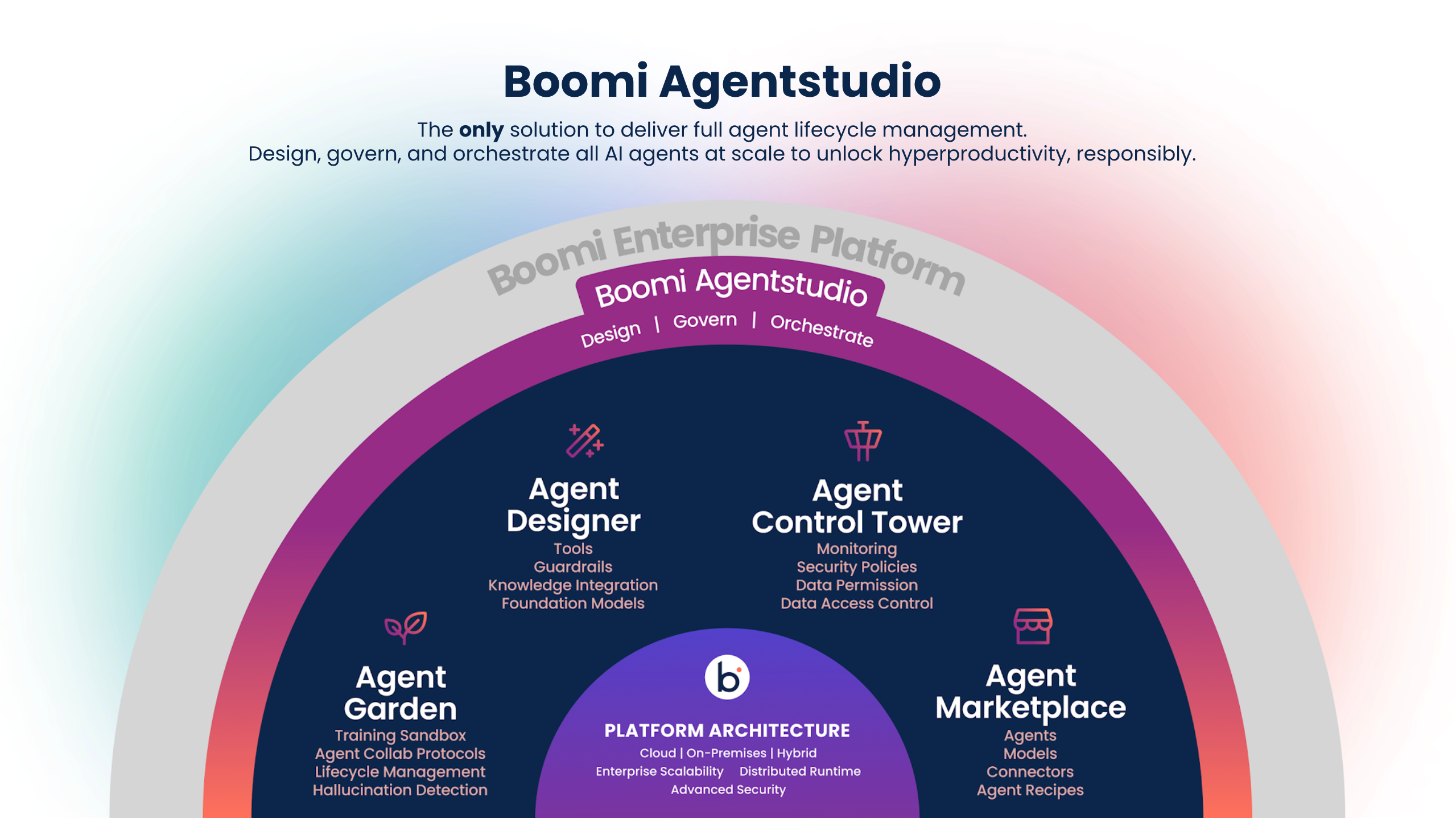
Boomi Agentstudio is a comprehensive suite of AI capabilities designed for the enterprise. It provides a robust platform for creating, managing, and deploying AI agents and tools, with built-in governance features for enhanced control, oversight, and compliance management.
Agentstudio includes capabilities across the AI development and management lifecycle, comprised of three main components:
- Agent Designer - Design and deploy AI agents quickly with intuitive low-code templates and tools in the Agent Designer. Seamlessly connect them to trusted data and ensure responsible development with built-in guardrails.
- Agent Garden - Manage and interact with AI agents effortlessly using the Agent Garden’s intuitive interface. Organize and deploy created agents, and streamline the AI lifecycle.
- Agent Control Tower - Maintain control over AI agents with the Agent Control Tower, the governance layer of Agentstudio. Proactively mitigate security and privacy risks while ensuring trust and compliance.
How do I access Agentstudio?
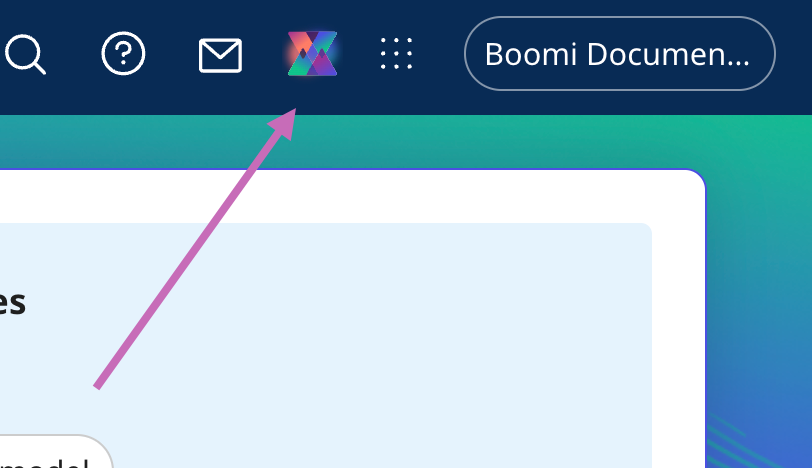
To access Agentstudio, click the Agentstudio icon in the Platform home page.
Administrators must select the Agentstudio icon > Get Started on the Boomi platform home page and accept terms and conditions on behalf of all account users. Refer to terms and conditions mentioned in this document for more information.
How do I access Agent Designer?
Agent Designer is included in the Agentstudio Base edition, which is a part of all Boomi Enterprise Platform editions.
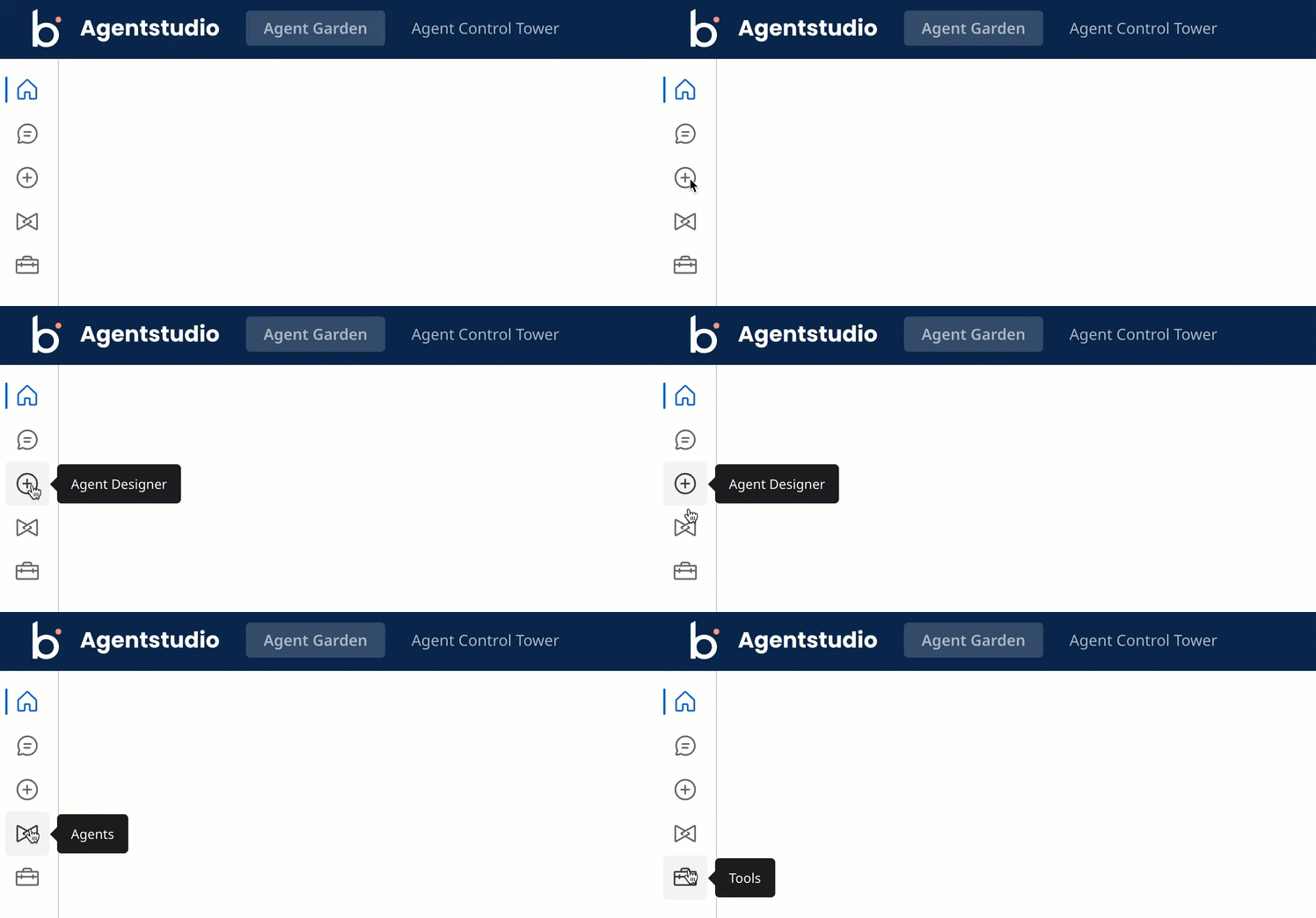
Navigate to the Agentstudio icon in the platform, then click Agent Garden to access the Agent Designer, Agents and Tools screens.
What permissions do I need to build agents?
To create, edit, and deploy agents and tools, you must have one of the following roles:
- Agent Garden Administrator
- Agent Garden Developer
- A custom role with privileges (Agent Garden Access, Agent Create, Agent Edit, Agent Feedback Submit, Agent Garden Feedback View)
How do I access Agent Garden?
Agent Garden is included in the Base edition of Agentstudio. To view the AI Agent Garden, click the Agentstudio icon on the platform's Home screen.
To accept requests from the Agent Garden, allow incoming traffic from the following IP addresses:
- 3.214.191.234
- 54.210.113.194
What permissions do I need to view and interact with AI agents?
User Management includes three Agent Garden roles:
- User
- Developer
- Administrator
As an administrator, you can give your users controlled access to the Agent Garden. For example, a developer can create, edit, and test agents, while another user can only use deployed agents in the conversational interface and see a list of all the deployed agents. Refer to Agent Garden for privilege details.
By default, all Platform Standard role users have the Agent Garden User role, which allows them to interact with installed agents in the conversational interface. All Platform administrators have the Agent Garden administrator role.
How do I access Agent Control Tower?
Agent Control Tower is included in the Base edition of Agentstudio. To view the Agent Control Tower, click the Agentstudio icon on the platform's Home screen and then navigate to the Control Tower.
What permissions do I need to view and interact with AI agents in Agent Control Tower?
With an Administrator role or a developer role, you can access and utilize the Agent Control Tower. However, the Agent Control Tower works with providers and connecting to providers to manage your agents. Each provider has their own prerequisites that need to be met to utilize the service. For more information, refer to Connecting to providers.
What foundation model do you use for AI agents?
The Agent Designer employs a framework that selects the most suitable model for a given function, such as reasoning, summarization, and guardrails. It uses Large Language Models (LLMs) via Amazon Bedrock's managed service.
What are Marketplace agents?
The Boomi Marketplace features agents built by Boomi Technology Partners and members of the Boomi Community. Explore Agentstudio's Marketplace tab in the Agent Garden templates gallery for available agents and agent bundles you can install using the Agent Designer. Refer to Installing Marketplace agents to learn more.
If you are interested in sharing AI agents you've built with the Marketplace, refer to Publishing AI agents for details on becoming a Technology Partner and publishing your agents.
What are recommended agents?
The Agent Garden templates gallery displays recommended agent templates to help you identify existing processes in your account that you can use with Agent step to build agentic workflows.
How are agent recommendations generated?
Agentstudio generates agent recommendations based on de-identified metadata from your account’s processes, process components, and industry vertical. Refer to Data Collection for more information on how we collect data on the Boomi Platform.
Why build agentic workflows with Agent step?
The Agent step makes integrations smarter and simpler by embedding AI into automation, helping you streamline and enhance processes. It can:
- Replace complex process steps and routing with human-like reasoning and flexible, context-aware operations.
- Reduce the need for manual steps outside of the process's execution.
Apply the Agent step when a process includes a non-deterministic decision that requires contextual reasoning. For example, a CRM connector can send customer feedback survey data to an AI agent in an Agent step. The agent analyzes the sentiment of the feedback and determines that the feedback is negative. It generates a Jira ticket for the customer support manager. Refer to About AI agents and Agent step to learn more.
Platform agents
Does the Boomi Platform offer or provide any agents for customers?
Yes. Boomi Platform Agents are provided by Boomi at no cost to customers. Boomi Platform Agents allow customers to perform certain actions within the Boomi Enterprise Platform using natural language to more easily achieve their goals on the Boomi Platform. Boomi’s Agent Garden, accessed through Agentstudio, includes the following native Boomi Platform Agents.
- Boomi GPT - Enter your prompts in a conversational user interface, and Boomi GPT orchestrates Boomi DesignGen, Boomi Answers, and Boomi Scribe to help you achieve your business goals.
- DesignGen - Design integration processes with generative AI based on 300M+ patterns and best practices and refine them to fit your requirements.
- Scribe - Let generative AI write documentation for your existing and new integration processes.
- Answers - Get quick answers to your questions about the Boomi Enterprise Platform using knowledge from Help.Boomi.com and the Boomi Community.
- Pathfinder - Get automated data mapping and recommendations for the next steps in building integrations.
- DataDetective - Protect sensitive information with AI-powered data classification and track data movement across regions.
- HubGen - Let generative AI build model drafts in Hub based on your data synchronization goals.
- Resolve Agent - Get quick solutions to your integration process errors using knowledge from Help.Boomi.com and the Boomi Community.
- API Documentation Agent - Autonomously generate business and technical documentation from API definitions to accelerate time-to-market and increase adoption.
- API Design Agent - Rapidly design APIs and generate comprehensive, deployment-ready 3.1.0 OpenAPI specifications.
- Integration Advisor Agent - Optimize your integration and identify areas for improvement using AI analysis based on Boomi best practices.
- Data Connector Agent - Autonomously build custom data connectors for any REST-based data source. Accelerate ELT pipeline development up to 30x faster.
Read Boomi AI to learn more.
How do I get access to Platform AI agents?
Platform AI agents listed above are enabled for all Boomi users with an account ID. You do not need to request access.
Before you can access the Platform AI agents you must have the following:
- Agreement to the Boomi AI terms and conditions. Administrators must select the Agentstudio icon > Get Started on the Boomi platform home page and accept terms and conditions on behalf of all account users.
- Integration Build Read Write access. Read User roles and privileges to learn more about default Boomi Enterprise Platform roles and permissions.
- Create Component API feature enabled on your account.
- Connectors enabled on your account. Many connectors are enabled by default. However, certain connectors may not be available due to licensing or your subscription. Read Connector licenses and classes to learn more about connection licenses and your subscription.
Can I get Boomi AI access removed from my account?
Yes, please contact Sales.
Are there usage limits on Platform AI agents?
Yes, to ensure optimal service for all users, we have implemented daily AI service request limits for all accounts, which reset at 12:00 AM UTC. As a result, Boomi GPT may display the following error message when the limit is exceeded: You have reached our daily limit of messages. Please try again later.
Additionally, usage of some agents will count towards the platform API consumption limits for your account.
Boomi GPT
Where is Boomi GPT located in the Boomi Enterprise Platform?
Click the Agentstudio icon in the Platform home page. Navigate to Agent Garden > Chat.
Is Boomi GPT available in all geographies and to all customers?
Yes, it is available in all geographies and to all customers.
What languages does Boomi GPT support?
The Boomi GPT conversational experience currently supports English.
What does the New Conversation button do?
It clears the conversation screen so you can start a new conversation.
Does the New Conversation button overwrite the integration processes that were created?
No, it only clears the conversation screen.
Is the conversation history saved?
Yes, Boomi GPT saves conversation history.
DesignGen
What permissions are required to use Boomi DesignGen?
Integration Build Read Write Access to build integrations using Boomi DesignGen. The standard user role includes this access.
Does Boomi DesignGen learn from the processes that customers created?
Yes, Boomi DesignGen learns from the de-identified metadata of over 300 million integrations from approximately 20,000 customers. The model is built on the data collected as described in Data Collection.
Why is the Integration Process created not what I intended?
The Boomi AI large language model's responses are dependent upon the input it receives by the user, and different inputs may return different results.
Where are components created by Boomi DesignGen saved? Can I choose my own component folder for Boomi AI?
No, Boomi DesignGen stores all created components in the Created_by_BoomiAI folder.
Why can't I use an existing connection component for the integration?
Boomi DesignGen lets you select from up to five existing connection components. If you have more than five connection options, it will create a new connection. Currently, Boomi DesignGen only supports five existing connection options.
When Boomi DesignGen suggests multiple integrations, how many can I choose?
Currently, you can select and create only one integration at a time.
DataDetective
Does Boomi DataDetective use actual processed data within my integrations?
No, Boomi DataDetective does not use your processed data. Like our other AI Products, DataDetective solely uses the customer-agnostic metadata as outlined in the Data Collection. If you have turned off Boomi data collection, you will not see data in Boomi DataDetective.
Does Boomi DataDetective use any external service to identify PII?
No, Boomi DataDetective utilizes Boomi internal SLMs to determine and classify the sensitivity of your data, including PII. It classifies data as PII by looking at field names and process step names.
Resolve agent
Why can't I see a Generate Solution with Resolve Agent button when I view error details in Integration?
Your Boomi Administrator needs to enable AI for your organization's platform account. Contact your Boomi Administrator for more information.